In the competitive world of social media, guesswork won't get you far. To truly grow your audience and make a lasting impact on Instagram, you need a strategy rooted in data. This is where Instagram Insights comes in: your personal analytics dashboard, packed with valuable information about your content, audience, and overall performance.
But simply having access to this data isn't enough. Many creators glance at their numbers, feel a fleeting sense of success or disappointment, and then move on. The real power lies in understanding how to use Instagram Insights effectively: to identify patterns, pinpoint opportunities, and refine your approach systematically.
This guide will demystify Instagram Insights, showing you exactly what metrics matter, where to find them, and most importantly, how to translate raw data into actionable steps for genuine, sustainable growth. If you're ready to stop guessing and start strategizing, let's dive into making your Instagram data work for you.
What Are Instagram Insights and Why Do They Matter for Creators?
Instagram Insights is the platform's native analytics tool, providing a comprehensive overview of your account's performance. It’s available exclusively to Professional Accounts, meaning you need to switch from a Personal Account to either a Creator Account or Business Account to access it. For most creators, the Creator Account offers a good balance of features, including access to detailed analytics without needing a linked Facebook page.
Think of Insights as your feedback loop. Every piece of content you post, every story you share, every Reel you upload generates data points. Insights collects and organizes these points, allowing you to see beyond likes and comments and understand the deeper impact of your efforts. Without this data, you're essentially flying blind, unable to definitively know what resonates with your audience and what doesn't.
For creators, understanding your performance metrics is paramount. It allows you to:
True growth on Instagram comes from continually refining your content to meet the demands and preferences of your audience. Instagram Insights provides the roadmap for that refinement.
- Identify your best-performing content: Which posts, Reels, or Stories get the most engagement and reach?
- Understand your audience: Who are they? Where are they located? When are they most active?
- Optimize your posting strategy: When should you post for maximum visibility?
- Refine your content pillars: What topics and formats truly resonate?
- Track progress towards your goals: Are your efforts leading to more followers, profile visits, or website clicks?
- Make data-driven decisions: Move beyond intuition and base your strategy on tangible evidence.
How to Access Your Instagram Insights
Accessing your Instagram Insights is straightforward, provided you have a Creator or Business account. Here's how:
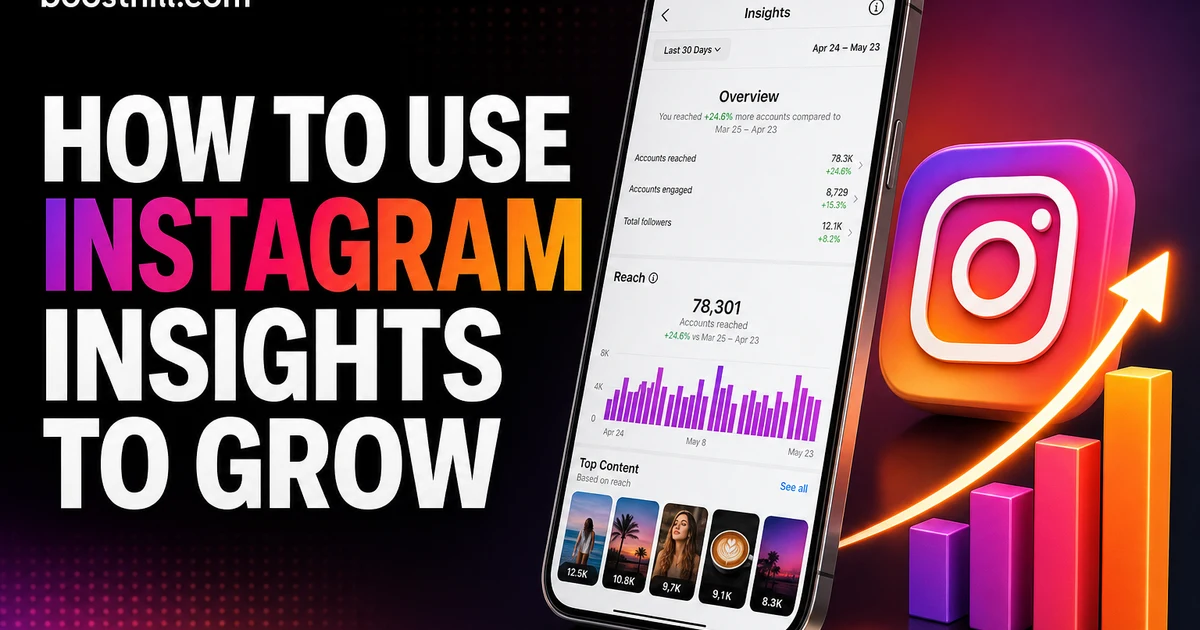
Once you're in the Insights dashboard, you'll see a high-level overview of your account's performance for the last 7, 14, or 30 days (or a custom date range). From here, you can dive deeper into specific categories like Accounts Reached, Accounts Engaged, Total Followers, and details about individual content pieces.
- Open the Instagram app.
- Go to your profile page.
- Tap the "Professional Dashboard" button located just below your bio (or the three horizontal lines in the top right corner, then select "Insights").
Key Instagram Metrics to Track and Understand
To effectively use Instagram Insights, you need to understand what each metric represents and why it matters. Here are the core metrics you'll encounter:
Beyond these overarching metrics, Instagram Insights also provides detailed breakdowns for specific content types (Posts, Reels, Stories) and your audience demographics. We'll delve into those next.
- Reach: The number of unique accounts that saw your content. This tells you how widely your content is being distributed.
- Impressions: The total number of times your content was shown. This can be higher than reach because one account might see your content multiple times (e.g., scrolling past it, then coming back later).
- Engaged Accounts: The number of unique accounts that interacted with your content in any way (likes, comments, saves, shares, profile visits, taps). This is a crucial metric for understanding genuine interest.
- Content Interactions: A sum of all actions taken on your content, including likes, comments, saves, and shares. High interaction rates signal strong resonance and often boost your content's visibility.
- Follower Activity (Audience Tab): This section is gold for understanding who your audience is. You'll find data on:
- Profile Activity: This includes actions taken from your profile, such as Profile Visits, Website Taps, and Email/Call Button Taps. It helps measure how effective your profile is at converting viewers into more engaged audience members or customers.
Diving Deeper: Post, Reels, and Story Insights
While the overall account insights provide a broad picture, the true power of Instagram Insights comes from analyzing individual content performance. Each content type has its own set of specific metrics that can guide your strategy.
By regularly reviewing these specific content insights, you can quickly spot trends. Are your Reels consistently outperforming static posts in terms of reach? Do your Stories get more saves when you include polls? This granular data helps you tailor your content calendar and format choices for maximum impact.
For example, if you notice your Reels are getting high reach but low saves, perhaps your content is entertaining but not providing enough lasting value. Conversely, high saves on a carousel post indicate your audience finds that information useful enough to revisit. Understanding these nuances is key to knowing how to use Instagram Insights to your advantage.
- Posts (Photos & Carousels):
- Reels:
- Stories:
- Live Videos:
Translating Insights into Actionable Strategy
Having data is one thing; turning it into a growth strategy is another. This is where you leverage what you've learned from Instagram Insights to make tangible changes to your content plan. Remember, the goal is not just to see the numbers, but to understand the "why" behind them and then act accordingly.
Here’s how to use Instagram Insights to build a truly data-driven strategy:
Genuine engagement is the cornerstone of sustainable growth. When you use Instagram Insights to understand your audience and optimize your content, you naturally attract more authentic interactions. This is the BoostHill philosophy: real engagement built on real value, not inflated numbers. When people genuinely connect with your content, they’re more likely to follow, share, and stick around, forming a loyal community around your brand.
Don't be afraid to experiment. Use Insights to form a hypothesis (e.g., "Posting short-form Reels with educational tips will increase saves"), implement it, and then check your Insights again after a few weeks to see if your hypothesis was correct. This iterative process is how you truly master your Instagram presence.
Common Mistakes to Avoid When Using Instagram Insights
Even with access to all this data, many creators fall into common traps that prevent them from fully capitalizing on their Insights. Knowing these pitfalls can help you steer clear and ensure you're making the most of your analytics.
By avoiding these common mistakes, you'll be well on your way to truly understanding and leveraging your Instagram Insights for meaningful and sustained growth. It’s not just about looking at the numbers; it’s about thoughtful interpretation and consistent action.
- Focusing Only on Vanity Metrics: Likes and follower counts are important, but they don't tell the whole story. Reach, saves, shares, and audience engagement rate often provide a more accurate picture of content effectiveness and audience loyalty. A post with fewer likes but many saves and shares might be more valuable in the long run.
- Not Tracking Consistently: Looking at Insights once a month won't give you enough data to spot trends. Make it a habit to check your Insights weekly, or even daily for specific campaigns, to monitor performance and react quickly.
- Ignoring Negative Trends: It's easy to celebrate successes, but it's equally important to analyze content that performed poorly. What was different? Was the topic less relevant? Was the visual quality off? Learning from your "failures" is crucial for improvement.
- Failing to Segment Your Data: Don't just look at overall account performance. Dive into individual posts, Reels, and Stories. Compare different content formats, topics, or call-to-actions to see what truly resonates.
- Not Cross-Referencing with Overall Goals: Your Insights should always be viewed through the lens of your larger Instagram goals. If your goal is to drive website traffic, then website taps and profile visits are more important than reach alone. If it's community building, then comments and shares take precedence.
- Comparing Yourself to Others: Every account's audience and content strategy are unique. While it's helpful to draw inspiration, directly comparing your metrics to another creator's is often unhelpful and can lead to misguided strategies. Focus on improving your own numbers over time.
Final Thoughts: The Power of Data-Driven Growth
Learning how to use Instagram Insights isn't just about crunching numbers; it's about building a deeper connection with your audience and creating content that truly matters to them. By consistently analyzing your data, you gain invaluable knowledge that empowers you to make informed decisions, refine your strategy, and ultimately, grow your presence authentically.
Remember, Instagram's algorithm prioritizes engagement. When your content consistently performs well, it tells the platform that your audience finds it valuable, leading to greater visibility. This is a virtuous cycle: Insights help you create better content, better content drives more genuine engagement, and more engagement leads to broader reach. This is how you really begin to build a powerful and enduring presence on the platform, attracting an engaged community rather than just chasing vanity metrics.
So, make Instagram Insights your trusted partner in your creator journey. Stop guessing, start analyzing, and watch your Instagram presence transform.
If you want to grow faster, you can buy instagram followers from a real, active-account service and build momentum while you keep posting.
For a deeper dive, read our guide on How to Get Verified on Instagram in 2026 (The Blue Check, Honestly Explained).
For a deeper dive, read our guide on How to Get Verified on Instagram in 2026 (The Blue Check, Honestly Explained).
For a deeper dive, read our guide on How to Get Verified on Instagram in 2026 (The Blue Check, Honestly Explained).
For a deeper dive, read our guide on How to Get Verified on Instagram in 2026 (The Blue Check, Honestly Explained).
For a deeper dive, read our guide on How to Get Verified on Instagram in 2026 (The Blue Check, Honestly Explained).
For a deeper dive, read our guide on How to Get Verified on Instagram in 2026 (The Blue Check, Honestly Explained).
For a deeper dive, read our guide on How to Get Verified on Instagram in 2026 (The Blue Check, Honestly Explained).
For a deeper dive, read our guide on How to Get Verified on Instagram in 2026 (The Blue Check, Honestly Explained).
For a deeper dive, read our guide on How to Get Verified on Instagram in 2026 (The Blue Check, Honestly Explained).
For a deeper dive, read our guide on How to Get Verified on Instagram in 2026 (The Blue Check, Honestly Explained).
Frequently asked questions
Read next: Instagram AI Growth: How to Grow Without Losing Trust. For more, browse our Instagram guides or all posts by Eliza Rose.